

For decades, Windows Notepad was the ultimate “no-frills” tool. If you wanted structure, you went to Word; if you wanted math, you went to Excel. But the lines are blurring.
With the latest update (version 11.2510.6.0), currently rolling out to Windows Insiders, Microsoft introduces a feature many thought they’d never see: Native Table Support.
Why Tables in Notepad?
We’ve all been there – trying to align columns using the space bar or tabs, only for the formatting to break the second you change the font. This update would fix that by bringing lightweight, Markdown-based tables directly into the UI.
How to Use It?
The Grid Picker: Click the new Table icon on the formatting toolbar. Just like in Microsoft Word, you can drag your mouse to select your grid size (e.g., 3×4) or enter dimensions manually.
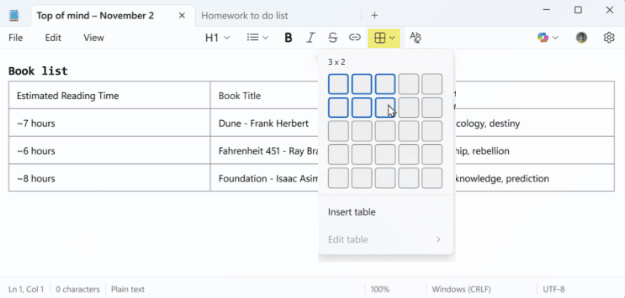
Contextual Edits: Once your table is live, right-clicking inside a cell gives you options to insert or delete rows and columns.
The “Markdown” Magic: Under the hood, Notepad is using Markdown syntax. If you toggle formatting off, you’ll see the familiar pipe-and-dash structure. This is a huge win for developers and documentation nerds who want portability.
See: The AI Scaling Trap . . .
Is Notepad becoming “bloated”? Some purists say yes. However, from a content and workflow perspective, this is a brilliant move. It fills the gap left by the retirement of Word Pad. You get the structure of a document editor with the “instant-on” speed of a text file.
If you hate the new look, you can disable all rich formatting in the settings (the gear icon) to return to the classic, distraction-free text experience.
Are you an Insider? Check your version and let me know in the comments: Does Notepad need tables, or should it stay “plain” forever?